CKAD-journey
Kubernetes Deployment Object: The Complete Guide
Introduction
This guide provides a comprehensive overview of Kubernetes Deployment objects, a crucial component for the CKAD exam. Deployments are a key Kubernetes API object type used for deploying and managing stateless workloads in a declarative manner.
What is a Deployment?
A Deployment is a higher-level Kubernetes resource that manages ReplicaSets and Pods. It provides the following key functionality:
- Automated management of Pod replicas
- Declarative updates to applications
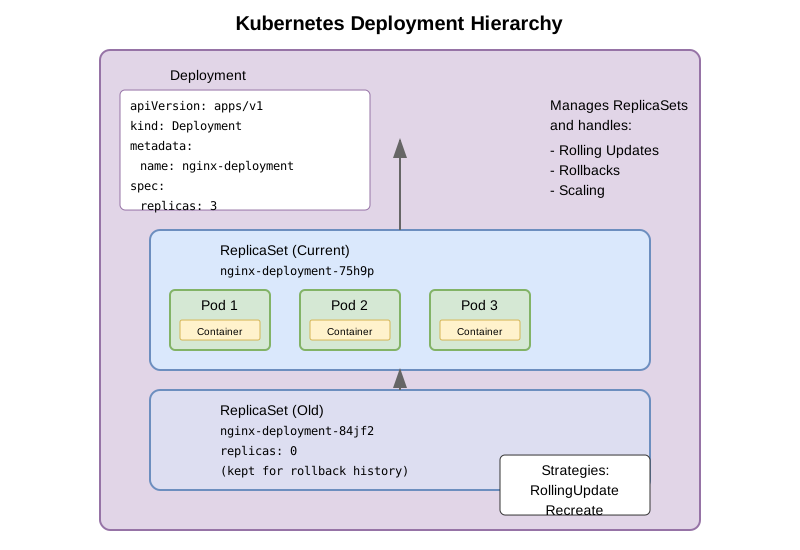
- Versioning through ReplicaSets
- Scaling of Pod instances
- Rolling updates and rollbacks
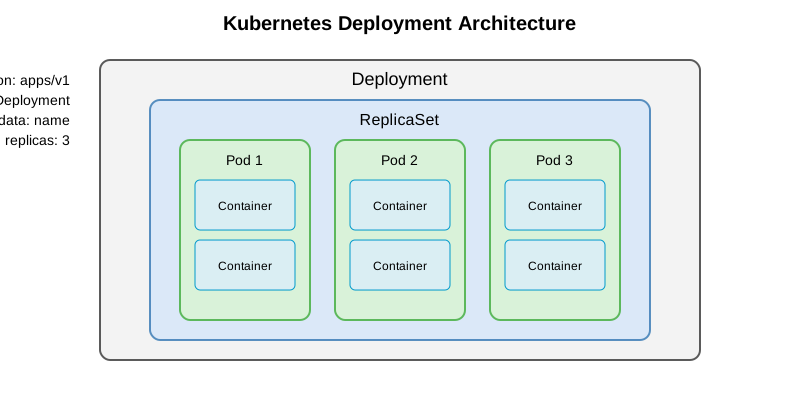
Deployments add an abstraction layer over ReplicaSets, making it easier to update applications. In production environments, workloads are rarely deployed directly via ReplicaSets because they lack the functionality necessary for easily updating Pods.
Purpose and Functionality
Deployments excel at managing stateless applications by:
- Automating Pod creation and management: Deployments handle the creation and management of Pod replicas automatically
- Providing declarative updates: When you update the Pod template in the Deployment manifest, the Deployment controller creates new Pods with the updated template
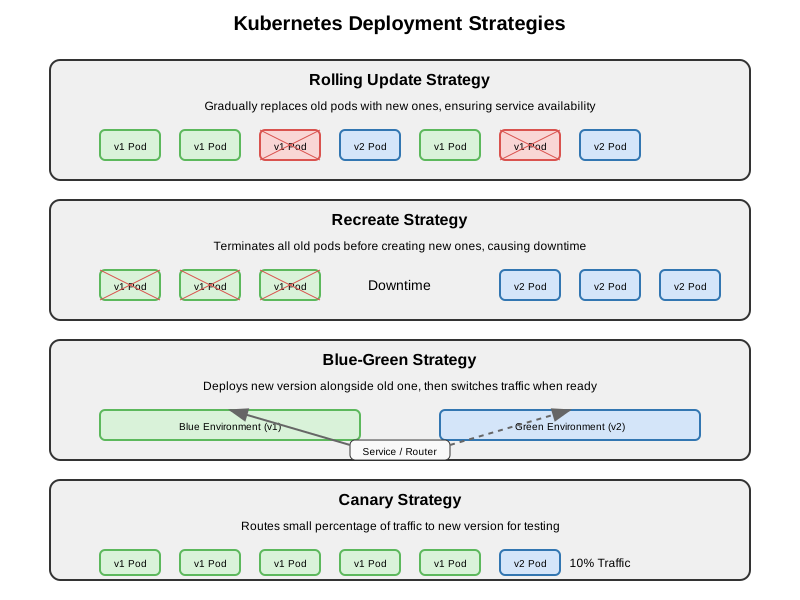
- Implementing update strategies: During an update, the Deployment controller replaces Pods based on the configured strategy, such as:
- Recreate strategy: All Pods are replaced at once (downtime)
- RollingUpdate strategy: Pods are gradually replaced (minimal/zero downtime)
- Horizontal scaling: Deployments allow you to scale your workloads by increasing or decreasing the number of Pod replicas
Defining a Deployment
Basic Structure
Kubernetes objects, including Deployments, are typically defined in manifest files using YAML or JSON format. Here’s a basic Deployment manifest structure:
apiVersion: apps/v1
kind: Deployment
metadata:
  name: my-app
  labels:
    app: my-app
spec:
  replicas: 3
  selector:
    matchLabels:
      app: my-app
  template:
    metadata:
      labels:
        app: my-app
    spec:
      containers:
      - name: my-app
        image: my-app:1.0.0
        ports:
        - containerPort: 8080
Key Components of a Deployment Spec
- replicas: Specifies the desired number of Pod instances
- selector: Uses matchLabels to identify the Pods managed by the Deployment
- template: Defines the Pod template used to create new Pods
- metadata: Contains labels for the Pod
- spec: Contains the Pod specification, including containers, volumes, etc.
- strategy: Optional field that defines how Pods will be updated (defaults to RollingUpdate)
Creating a Deployment
You can create a Deployment in several ways:
Using kubectl create with YAML file
kubectl apply -f deployment.yaml
Using kubectl create deployment command
kubectl create deployment my-app --image=my-app:1.0.0 --replicas=3
Generate a Deployment YAML template
kubectl create deployment my-app --image=my-app:1.0.0 --dry-run=client -o yaml > deployment.yaml
Deployment Update Strategies
RollingUpdate Strategy (Default)
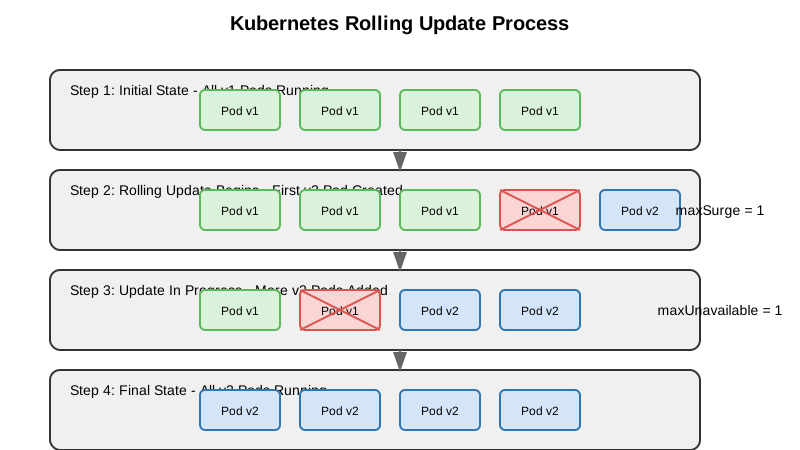
The RollingUpdate strategy gradually replaces old Pods with new ones, ensuring application availability during updates. You can configure:
- maxUnavailable: Maximum number or percentage of Pods that can be unavailable during the update
- maxSurge: Maximum number or percentage of Pods that can be created over the desired number of Pods
spec:
  strategy:
    type: RollingUpdate
    rollingUpdate:
      maxUnavailable: 25%
      maxSurge: 25%
Recreate Strategy
The Recreate strategy terminates all existing Pods before creating new ones, causing application downtime:
spec:
  strategy:
    type: Recreate
Managing Deployments
Scaling a Deployment
You can scale a Deployment to change the number of Pod replicas:
kubectl scale deployment my-app --replicas=5
Or by updating the replicas field in the YAML and applying the changes:
kubectl apply -f updated-deployment.yaml
Updating a Deployment
You can update a Deployment by:
- Editing the YAML file and applying changes:
kubectl apply -f updated-deployment.yaml - Using kubectl set image:
kubectl set image deployment/my-app my-app=my-app:2.0.0 - Using kubectl edit:
kubectl edit deployment my-app
Checking Deployment Status
kubectl rollout status deployment/my-app
Rolling Back a Deployment
kubectl rollout undo deployment/my-app
To roll back to a specific revision:
kubectl rollout undo deployment/my-app --to-revision=2
Viewing Deployment History
kubectl rollout history deployment/my-app
Pod Management and Configuration
Deployments manage Pods, which are the smallest deployable units in Kubernetes. You can configure various aspects of the Pods:
Commands and Arguments
Override the default command in the container image:
spec:
  containers:
  - name: my-app
    image: my-app:1.0.0
    command: ["/bin/sh"]
    args: ["-c", "echo Hello Kubernetes!"]
Environment Variables
Set environment variables for each container:
spec:
  containers:
  - name: my-app
    image: my-app:1.0.0
    env:
    - name: DB_HOST
      value: "mysql"
    - name: DB_PORT
      value: "3306"
ConfigMaps and Secrets
Use ConfigMaps for configuration data and Secrets for sensitive data:
spec:
  containers:
  - name: my-app
    image: my-app:1.0.0
    env:
    - name: DB_HOST
      valueFrom:
        configMapKeyRef:
          name: app-config
          key: db_host
    - name: DB_PASSWORD
      valueFrom:
        secretKeyRef:
          name: app-secrets
          key: db_password
Volumes and Mounts
Attach volumes to Pods:
spec:
  containers:
  - name: my-app
    image: my-app:1.0.0
    volumeMounts:
    - name: config-volume
      mountPath: /etc/config
  volumes:
  - name: config-volume
    configMap:
      name: app-config
Exposing Deployments
Once Pods are running via a Deployment, they can be exposed using a Service:
apiVersion: v1
kind: Service
metadata:
  name: my-app
spec:
  selector:
    app: my-app
  ports:
  - port: 80
    targetPort: 8080
  type: ClusterIP
Create a Service to expose the Deployment:
kubectl expose deployment my-app --port=80 --target-port=8080
Comparison with Other Controllers
StatefulSet vs Deployment
- Deployments: For stateless applications
- StatefulSets: For stateful applications requiring stable network identities and persistent storage
DaemonSet vs Deployment
- Deployments: Run specified number of Pods distributed across the cluster
- DaemonSets: Run exactly one Pod on each node (for node agents, monitoring tools, etc.)
Organization
Using Namespaces
Organize Deployments and other resources into namespaces:
metadata:
  name: my-app
  namespace: my-namespace
Using Labels and Selectors
Labels help identify which objects belong to which application:
metadata:
  labels:
    app: my-app
    tier: frontend
    environment: production
CKAD Exam Tips for Deployments
- Know the shortcuts:
- Create a deployment quickly:
kubectl create deployment my-app --image=nginx - Scale a deployment:
kubectl scale deployment my-app --replicas=3 - Update a deployment:
kubectl set image deployment/my-app my-app=nginx:1.19
- Create a deployment quickly:
- Use dry-run for YAML generation:
kubectl create deployment my-app --image=nginx --dry-run=client -o yaml > deployment.yaml - Understand rollout commands:
- Check status:
kubectl rollout status deployment/my-app - View history:
kubectl rollout history deployment/my-app - Pause rollout:
kubectl rollout pause deployment/my-app - Resume rollout:
kubectl rollout resume deployment/my-app - Undo rollout:
kubectl rollout undo deployment/my-app
- Check status:
-
Practice deployment updates and rollbacks as these are common exam scenarios
- Remember the main differences between Deployment, StatefulSet, and DaemonSet
Troubleshooting Deployments
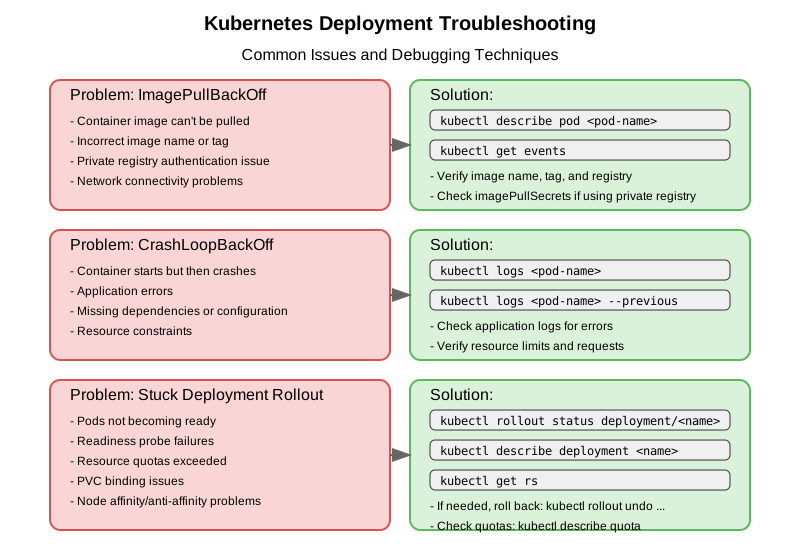
When facing issues with deployments, refer to the troubleshooting guide in the Deployment Strategies and Troubleshooting document for detailed steps and commands.
Common Deployment Use Cases
- Web Applications: Running stateless web servers, APIs, and microservices
- Background Workers: Processing jobs without state requirements
- Batch Processors: Running multiple instances of data processing applications
- CI/CD Components: Running build agents, test runners, and deployment tools
Conclusion
Kubernetes Deployments are a crucial resource for managing stateless applications in Kubernetes. Understanding how to create, update, and manage Deployments is essential for the CKAD exam and real-world Kubernetes administration. Practice creating and manipulating Deployments to build proficiency and prepare for the CKAD exam.