CKAD-journey
Kubernetes Deployment Strategies and Troubleshooting
This guide covers advanced deployment strategies and troubleshooting techniques for Kubernetes Deployments, essential knowledge for the CKAD exam and real-world kubernetes administration.
Advanced Deployment Strategies
Beyond the basic RollingUpdate and Recreate strategies, there are several patterns you can implement using Kubernetes resources:
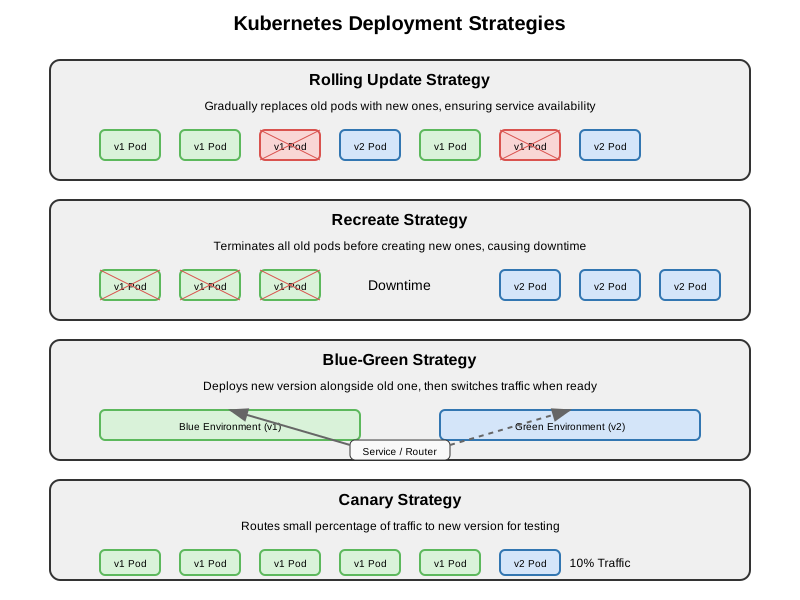
Blue-Green Deployments
Blue-Green deployment involves running two identical environments (blue and green), with only one active at a time. This allows for zero-downtime deployments with immediate rollback capability.
Implementation in Kubernetes:
- Create two identical Deployments with different versions:
- Blue Deployment: running the current version
- Green Deployment: running the new version
- Use a Service to direct traffic to the active deployment:
apiVersion: v1
kind: Service
metadata:
  name: my-app
spec:
  selector:
    app: my-app
    version: v1  # Initially points to blue deployment
  ports:
  - port: 80
    targetPort: 8080
-
Test the green deployment thoroughly
-
Switch traffic by updating the Service selector:
kubectl patch service my-app -p '{"spec":{"selector":{"version":"v2"}}}'
-
If issues occur, switch back to the blue deployment
-
Once confirmed working, the old deployment can be scaled down or removed
Canary Deployments
Canary deployments involve gradually routing a small percentage of traffic to a new version to test it with real users before full rollout.
Implementation in Kubernetes:
- Deploy the current version:
apiVersion: apps/v1
kind: Deployment
metadata:
  name: my-app-stable
spec:
  replicas: 9  # 90% of traffic
  selector:
    matchLabels:
      app: my-app
      version: stable
  template:
    metadata:
      labels:
        app: my-app
        version: stable
    spec:
      containers:
      - name: my-app
        image: my-app:1.0.0
- Deploy the canary version:
apiVersion: apps/v1
kind: Deployment
metadata:
  name: my-app-canary
spec:
  replicas: 1  # 10% of traffic
  selector:
    matchLabels:
      app: my-app
      version: canary
  template:
    metadata:
      labels:
        app: my-app
        version: canary
    spec:
      containers:
      - name: my-app
        image: my-app:2.0.0
- Create a Service that selects both versions:
apiVersion: v1
kind: Service
metadata:
  name: my-app
spec:
  selector:
    app: my-app  # Both versions have this label
  ports:
  - port: 80
    targetPort: 8080
- Gradually increase the canary version replicas and decrease the stable version replicas until fully migrated
A/B Testing
A/B testing is similar to canary deployments but focuses on testing features rather than stability:
- Deploy version A and version B
- Route specific users to each version based on criteria (headers, cookies, etc.)
- Use specialized ingress controllers or service meshes like Istio for traffic splitting
Troubleshooting Deployments
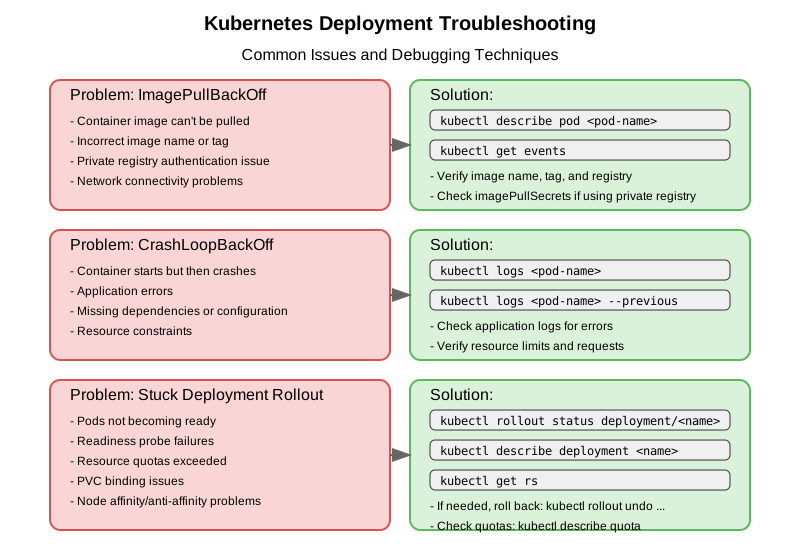
Common Deployment Issues
1. Pods Not Starting
Symptoms: Pods remain in Pending, ImagePullBackOff, or CrashLoopBackOff state
Troubleshooting Steps:
- Check Pod status and events:
kubectl get pods kubectl describe pod <pod-name> - Check logs:
kubectl logs <pod-name> kubectl logs <pod-name> --previous # For crashed containers - Common causes and solutions:
- Pending: Resources unavailable - check node capacity
- ImagePullBackOff: Invalid image name, registry authentication issues
- CrashLoopBackOff: Application errors, invalid configuration
2. Failed Rollouts
Symptoms: Deployment stuck at status “x out of y new replicas have been updated”
Troubleshooting Steps:
- Check Deployment status:
kubectl rollout status deployment/<deployment-name> - Check ReplicaSets:
kubectl get rs kubectl describe rs <new-replicaset-name> - Check failing Pods:
kubectl get pods -l <deployment-selector> kubectl describe pod <failing-pod> - Solutions:
- Fix issues with the new Pods
- Roll back to previous version:
kubectl rollout undo deployment/<deployment-name>
3. Scaling Issues
Symptoms: Deployment doesn’t scale to the desired number of replicas
Troubleshooting Steps:
- Check resource quotas:
kubectl describe quota -n <namespace> - Check nodes for resource constraints:
kubectl describe nodes - Check Pod affinity/anti-affinity rules or node selectors
4. Deployment Updates Not Applied
Symptoms: Changes to Deployment don’t result in new Pods
Troubleshooting Steps:
- Check if only non-template fields were changed (they don’t trigger rollout)
- Check if the update was properly applied:
kubectl describe deployment <deployment-name> - Verify the changes by checking the Pod template:
kubectl get deployment <deployment-name> -o yaml
Debugging Techniques
Using Debug Containers
Starting with Kubernetes 1.18, you can attach a debug container to a running Pod:
kubectl debug -it <pod-name> --image=busybox --target=<container-name>
Interactive Troubleshooting with a Temporary Pod
kubectl run debug --rm -it --image=busybox -- /bin/sh
Accessing Services from a Temporary Pod
kubectl run curl --rm -it --image=curlimages/curl -- curl http://my-service
Deployment Health Checks
Add readiness and liveness probes to your Deployments to improve reliability:
spec:
  containers:
  - name: my-app
    image: my-app:1.0.0
    livenessProbe:
      httpGet:
        path: /health
        port: 8080
      initialDelaySeconds: 15
      periodSeconds: 10
    readinessProbe:
      httpGet:
        path: /ready
        port: 8080
      initialDelaySeconds: 5
      periodSeconds: 10
Deployment Strategy Selection Guidelines
| Strategy | Use When | Avoid When |
|---|---|---|
| RollingUpdate | - Need zero downtime - Application supports N-1 compatibility |
- Cannot have multiple versions running - Limited cluster resources |
| Recreate | - Need complete version isolation - Downtime is acceptable |
- Zero downtime is required - User experience is critical |
| Blue/Green | - Need immediate rollback capability - Need to test the whole system before switching |
- Limited resources - High cost of running duplicate systems |
| Canary | - Need to test with real users - Want to gradually migrate |
- Application doesn’t work with multiple versions - Need to make quick updates |
CKAD Exam Tips for Deployment Troubleshooting
- Know how to check Deployment status:
kubectl get deployment <n> kubectl describe deployment <n> - Understand how to check Pod status:
kubectl get pods -l <deployment-selector> kubectl describe pod <pod-name> - Know how to check logs:
kubectl logs <pod-name> kubectl logs -l app=<app-name> - Be familiar with common error states:
- Pending, ImagePullBackOff, CrashLoopBackOff
- Error messages in Pod events
- Understand rollback operations:
kubectl rollout history deployment/<n> kubectl rollout undo deployment/<n> - Practice debugging scenarios:
- Fix a failing Deployment
- Fix a failing rolling update
- Investigate why Pods aren’t starting
Conclusion
Understanding advanced deployment strategies and troubleshooting techniques is crucial for the CKAD exam and real-world Kubernetes administration. By mastering these concepts, you’ll be able to deploy applications more effectively and solve issues when they arise.
Remember that Deployments are just one part of a larger application architecture. They typically work alongside Services, ConfigMaps, Secrets, and potentially Ingress controllers to create a complete application environment.