CKAD-journey
Mastering Deployment Rolling Updates in Kubernetes
Rolling updates are a crucial feature of Kubernetes Deployments that allows you to update your application with zero downtime. This guide provides a detailed explanation of rolling updates, which is an important topic for the CKAD exam.
Understanding Rolling Updates
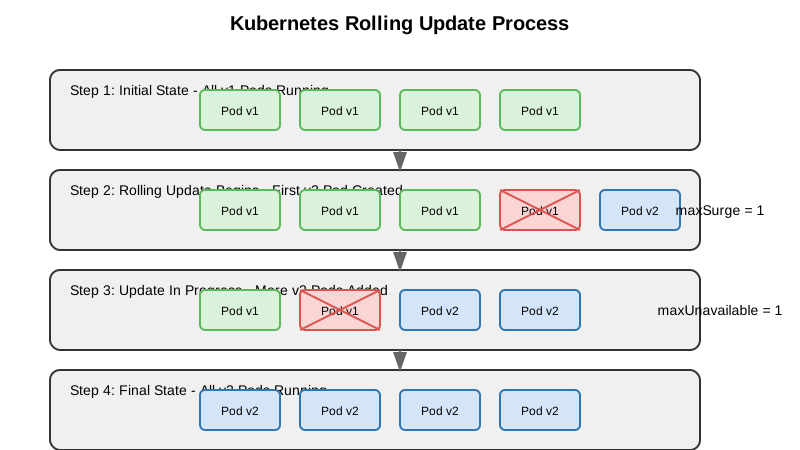
Rolling updates allow you to update your application declaratively. When you update the Pod template defined within the Deployment manifest, the Deployment controller replaces the old Pods with new Pods created using the updated template.
During a rolling update, the Deployment controller replaces Pods gradually, ensuring your application remains available throughout the update process.
Rolling Update vs. Recreate Strategy
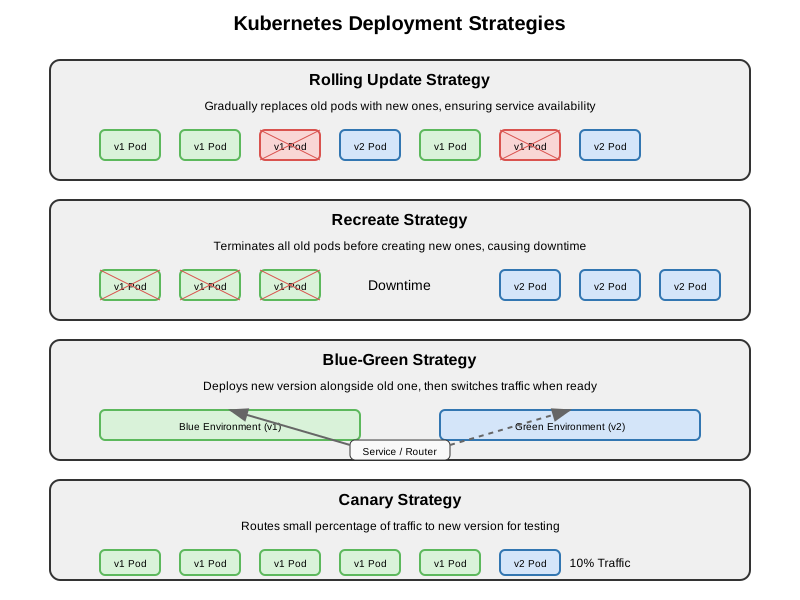
Kubernetes Deployments support two update strategies:
- RollingUpdate (default): Gradually replaces old Pods with new ones
- Recreate: Terminates all existing Pods before creating new ones
The key difference is that RollingUpdate maintains availability during updates, while Recreate causes downtime but ensures no two versions run simultaneously.
Configuring Rolling Updates
You can configure the rolling update behavior using two parameters:
maxUnavailable
Specifies the maximum number of Pods that can be unavailable during the update process. Can be an absolute number or percentage of desired Pods.
maxSurge
Specifies the maximum number of Pods that can be created over the desired number of Pods. Can be an absolute number or percentage of desired Pods.
Example configuration:
apiVersion: apps/v1
kind: Deployment
metadata:
  name: my-app
spec:
  replicas: 5
  strategy:
    type: RollingUpdate
    rollingUpdate:
      maxSurge: 1        # Maximum one Pod over desired count
      maxUnavailable: 1  # Maximum one Pod can be unavailable
  template:
    # Pod template definition
How Rolling Updates Work
When you update a Deployment, the following process occurs:
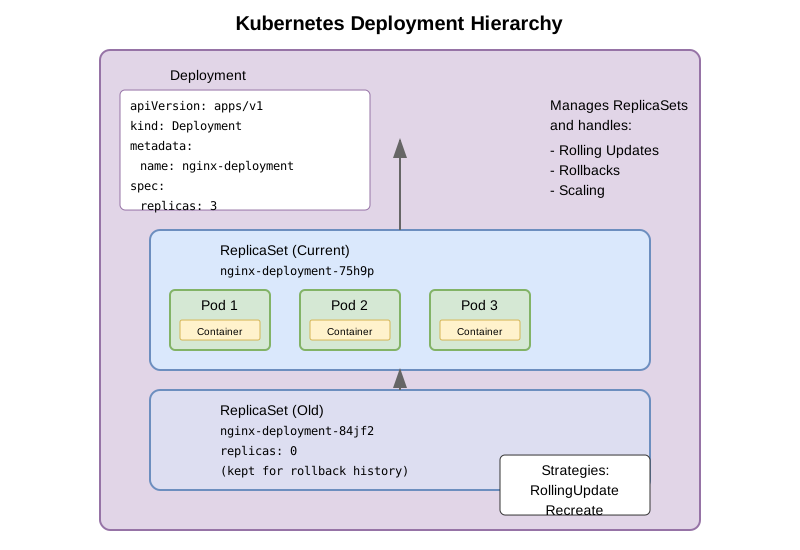
- A new ReplicaSet is created based on the updated Pod template
- The new ReplicaSet is gradually scaled up (limited by maxSurge)
- The old ReplicaSet is gradually scaled down (limited by maxUnavailable)
- Once all new Pods are ready and all old Pods are terminated, the update is complete
- Old ReplicaSets are kept (with 0 replicas) for rollback purposes
Controlling the Update Process
You can control the update process with these commands:
Check Update Status
kubectl rollout status deployment/my-app
Pause an Update
kubectl rollout pause deployment/my-app
Resume a Paused Update
kubectl rollout resume deployment/my-app
Rolling Back Updates
If an update causes issues, you can roll back to a previous version:
Roll Back to Previous Version
kubectl rollout undo deployment/my-app
Roll Back to Specific Revision
# First check available revisions
kubectl rollout history deployment/my-app

# Then roll back to a specific revision
kubectl rollout undo deployment/my-app --to-revision=2
Deployment Update Workflow Example
Let’s walk through a complete example of updating a Deployment:
- Create initial Deployment:
cat <<EOF | kubectl apply -f -
apiVersion: apps/v1
kind: Deployment
metadata:
  name: rolling-demo
spec:
  replicas: 4
  selector:
    matchLabels:
      app: nginx
  strategy:
    type: RollingUpdate
    rollingUpdate:
      maxSurge: 1
      maxUnavailable: 1
  template:
    metadata:
      labels:
        app: nginx
    spec:
      containers:
      - name: nginx
        image: nginx:1.19.0
        ports:
        - containerPort: 80
EOF
- Verify deployment:
kubectl get deployment rolling-demo
kubectl get pods -l app=nginx
- Update the Deployment:
kubectl set image deployment/rolling-demo nginx=nginx:1.20.0
- Watch the update process:
kubectl rollout status deployment/rolling-demo
In another terminal, you can see the Pods being created and terminated:
kubectl get pods -l app=nginx -w
- Check the ReplicaSets:
kubectl get rs
You’ll see both the old and new ReplicaSet, with the old one scaled down to 0.
- Check the update history:
kubectl rollout history deployment/rolling-demo
- Roll back if needed:
kubectl rollout undo deployment/rolling-demo
Best Practices for Rolling Updates
- Set appropriate resource requests and limits for your containers to ensure proper scheduling
- Configure readiness probes to ensure traffic only goes to ready Pods
- Choose appropriate maxSurge and maxUnavailable values:
- For critical applications, use low values for maxUnavailable
- For faster updates, increase maxSurge
- Test updates in non-production environments first
- Use the record flag to annotate updates with the change-cause:
kubectl set image deployment/my-app my-container=my-image:v2 --record
Common Pitfalls and Troubleshooting
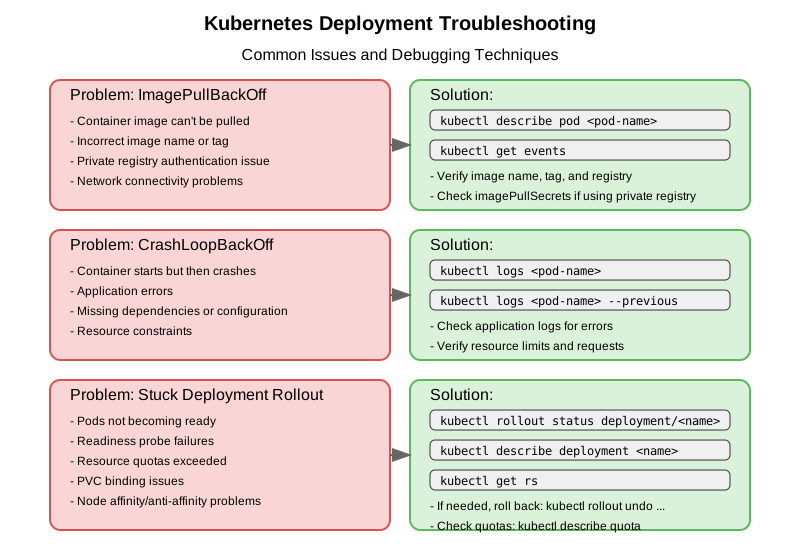
New Pods Not Coming Up
If new Pods aren’t becoming ready, check:
- Pod events:
kubectl describe pod <pod-name> - Container logs:
kubectl logs <pod-name> - Readiness probe configuration
Rollout Stuck
If a rollout appears stuck, check:
- Deployment events:
kubectl describe deployment <n> - Pod status:
kubectl get pods - Resource constraints: Check if there are enough resources for new Pods
Slow Rollouts
If rollouts are taking too long:
- Adjust maxSurge and maxUnavailable for faster updates
- Optimize container startup time
- Simplify readiness probe checks
CKAD Exam Tips for Rolling Updates
- Know the default values:
- Default strategy is RollingUpdate
- Default maxSurge and maxUnavailable are both 25%
- Understand key commands:
- Set image:
kubectl set image deployment/name container=image:tag - Check status:
kubectl rollout status deployment/name - View history:
kubectl rollout history deployment/name - Undo rollout:
kubectl rollout undo deployment/name
- Set image:
-
Practice monitoring rollouts with
kubectl get pods -w - Be familiar with rollout failure scenarios and how to fix them
Conclusion
Mastering rolling updates is essential for modern application deployment and is a key topic on the CKAD exam. By understanding how to configure and manage rolling updates, you’ll be able to update applications with zero downtime and quickly roll back if issues occur.
Remember that rolling updates are one of the main advantages of using Deployments over directly managing ReplicaSets or Pods. This feature makes Deployments the preferred resource for deploying stateless applications in Kubernetes.