CKAD-journey
Mastering Kubernetes Pods: The Essential Building Block
Table of Contents
- Introduction
- What is a Pod?
- Pod Anatomy
- Pod Lifecycle
- Creating and Managing Pods
- Pod Configuration Best Practices
- Multi-Container Pods
- Pod Networking
- Resource Management
- Security Contexts
- Troubleshooting Pods
- Exam Tips for CKAD
- Hands-on Lab
- Conclusion
Introduction
Welcome to the first module of our CKAD journey! This article focuses on Kubernetes Pods, which are the most fundamental units of deployment in Kubernetes. Understanding Pods thoroughly is crucial for the Certified Kubernetes Application Developer (CKAD) exam and for real-world Kubernetes deployments.
As DevOps engineers, we need to master how Pods work, their lifecycle, and how they fit into the broader Kubernetes ecosystem. This knowledge forms the foundation for working with more complex resources like Deployments, StatefulSets, and DaemonSets.
What is a Pod?
A Pod is the smallest deployable unit in Kubernetes. It represents a single instance of a running process in your cluster. Pods encapsulate one or more containers, storage resources, a unique network IP, and options that govern how the container(s) should run.
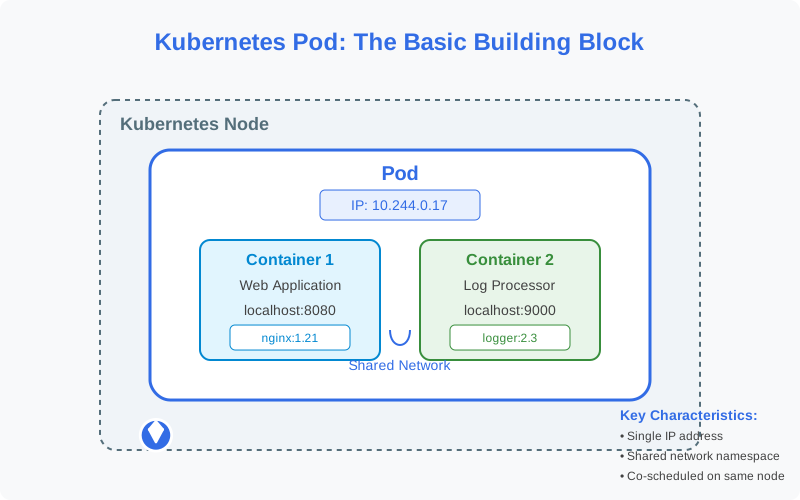
Key Characteristics of Pods:
- Atomic unit: Pods are created, scheduled, and managed as a single entity
- Shared context: Containers in a Pod share network namespace, IPC namespace, and often, volumes
- Co-location: All containers in a Pod run on the same node
- Ephemeral: Pods are designed to be disposable and replaceable
Pod Anatomy
Let’s examine the components that make up a Pod:
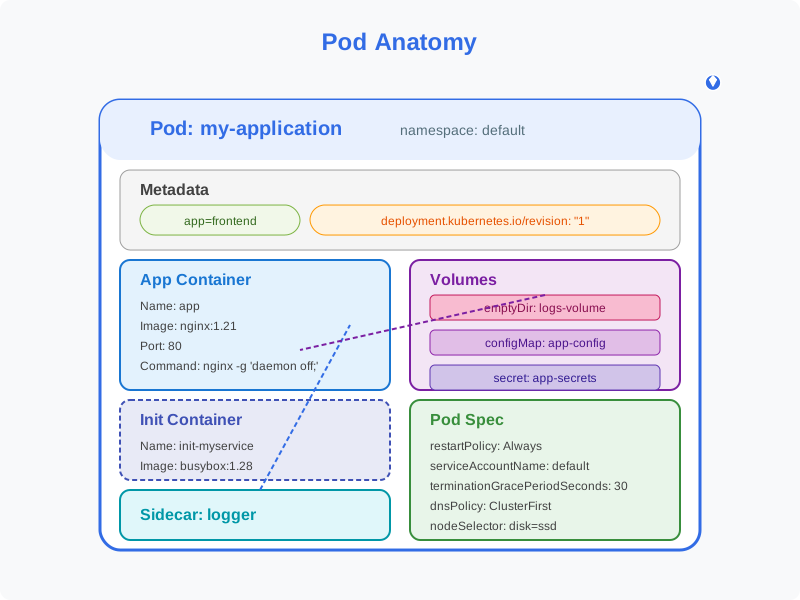
Essential Pod Components:
1. Containers
- Application container: Runs your application code
- Init containers: Run before app containers, used for setup tasks
- Sidecar containers: Enhance or monitor the main container
2. Volumes
- Shared storage that can be accessed by all containers in the Pod
- Persists data beyond container restarts (but not necessarily Pod restarts)
3. Pod Metadata
- Labels: Key-value pairs for identifying and selecting Pods
- Annotations: Non-identifying metadata for tools and libraries
- Name: Unique identifier within a namespace
4. Pod Spec
- Resource requirements: CPU, memory limits and requests
- Restart policy: How Pod containers should be restarted
- Node selector: Constraints for scheduling the Pod
- Service account: Identity for processes running in the Pod
Pod Lifecycle
Understanding the Pod lifecycle is crucial for debugging and managing applications effectively.
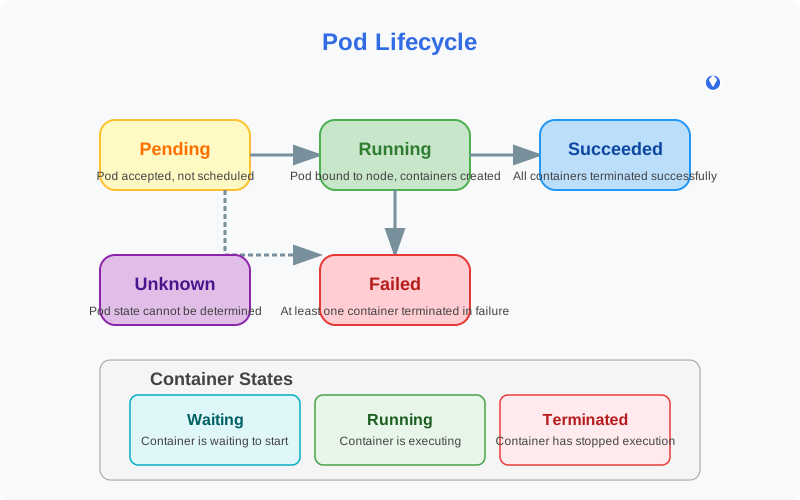
Pod Phases:
- Pending: Pod has been accepted but not yet scheduled
- Running: Pod has been bound to a node, and all containers are running
- Succeeded: All containers have terminated successfully
- Failed: At least one container has terminated with failure
- Unknown: Pod state cannot be determined
Container States:
- Waiting: Container is waiting to start
- Running: Container is executing without issues
- Terminated: Container has stopped execution
Pod Conditions:
- PodScheduled: Pod has been scheduled to a node
- ContainersReady: All containers in the Pod are ready
- Initialized: All init containers have completed successfully
- Ready: Pod can serve requests and should be added to load balancing pools
Creating and Managing Pods
Let’s look at different ways to create and manage Pods:
Pod Manifest (YAML):
apiVersion: v1
kind: Pod
metadata:
  name: nginx-pod
  labels:
    app: nginx
spec:
  containers:
  - name: nginx
    image: nginx:1.21
    ports:
    - containerPort: 80
    resources:
      limits:
        memory: "128Mi"
        cpu: "500m"
      requests:
        memory: "64Mi"
        cpu: "250m"
Common Pod Management Commands:
# Create a Pod
kubectl create -f pod.yaml

# Create a Pod using a generator
kubectl run nginx --image=nginx

# Get information about Pods
kubectl get pods
kubectl get pod nginx-pod -o yaml
kubectl describe pod nginx-pod

# Delete a Pod
kubectl delete pod nginx-pod
kubectl delete -f pod.yaml
Pod Configuration Best Practices
When configuring Pods for production environments, consider these best practices:
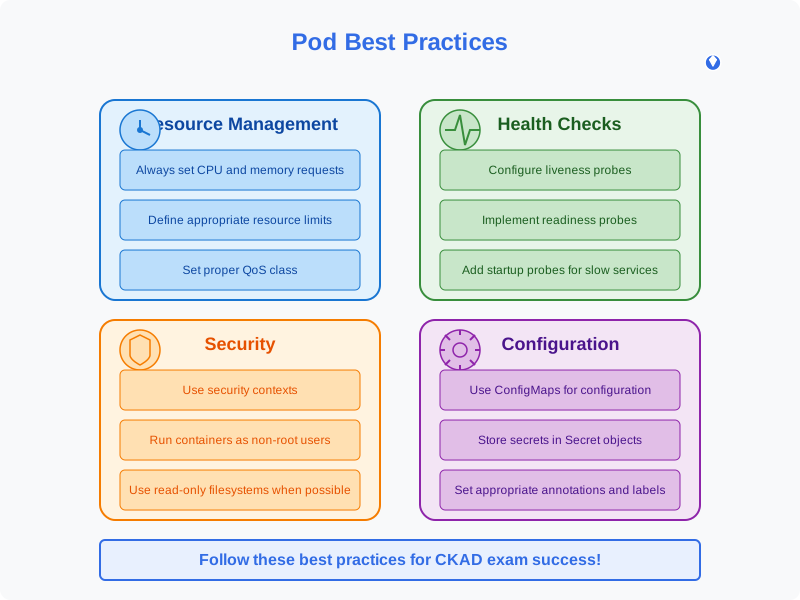
1. Resource Management
- Always specify resource requests and limits
- Be conservative with resource requests
- Set appropriate QoS class through resource configuration
2. Health Checks
- Implement liveness probes to detect application failures
- Use readiness probes to control traffic to your application
- Add startup probes for slow-starting applications
livenessProbe:
  httpGet:
    path: /healthz
    port: 8080
  initialDelaySeconds: 15
  periodSeconds: 10
readinessProbe:
  httpGet:
    path: /ready
    port: 8080
  initialDelaySeconds: 5
  periodSeconds: 5
3. Pod Disruption Budgets
- Protect critical applications from voluntary disruptions
- Ensure high availability during cluster maintenance
4. Pod Security
- Use security contexts to limit privileges
- Implement network policies to control traffic
- Use secrets and config maps for sensitive data
Multi-Container Pods
Multi-container Pods enable several common design patterns in Kubernetes:
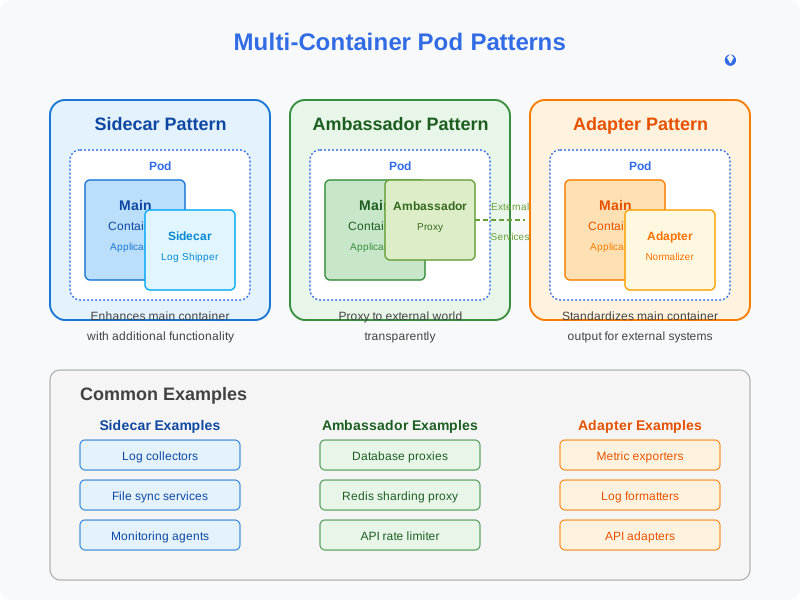
Sidecar Pattern
Enhances the main container with additional functionality:
- Log shippers
- Sync services
- Watchers
Ambassador Pattern
Represents the main container to the outside world:
- Proxy local connections to the world
- Connection to different environments without changing application
Adapter Pattern
Standardizes and normalizes output from the main container:
- Ensuring consistent monitoring data format
- Transforming application output to match expected interface
Example Multi-Container Pod:
apiVersion: v1
kind: Pod
metadata:
  name: web-app
spec:
  containers:
  - name: web-app
    image: nginx:1.21
    volumeMounts:
    - name: shared-logs
      mountPath: /var/log/nginx
  - name: log-sidecar
    image: busybox
    command: ["sh", "-c", "tail -f /var/log/nginx/access.log"]
    volumeMounts:
    - name: shared-logs
      mountPath: /var/log/nginx
  volumes:
  - name: shared-logs
    emptyDir: {}
Pod Networking
Understanding Pod networking is essential for designing effective microservices:
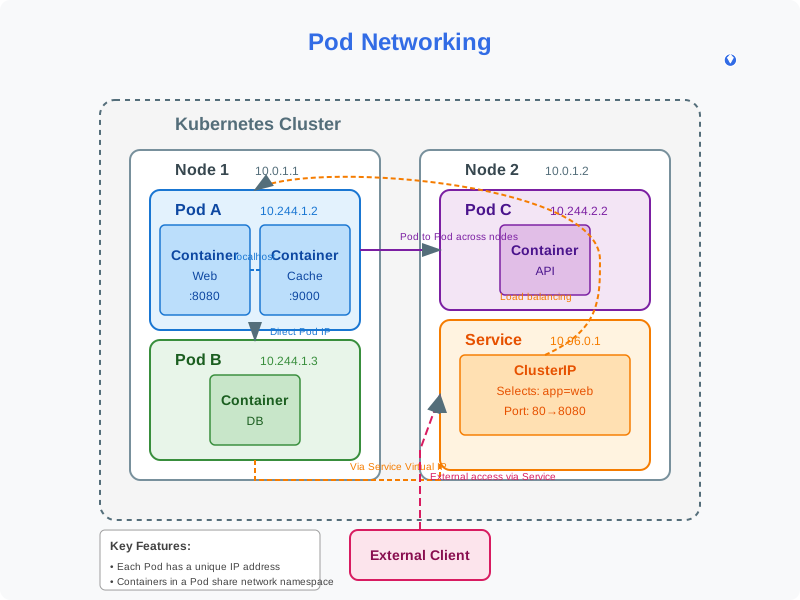
Pod Network Characteristics:
- Each Pod gets its own IP address
- All containers in a Pod share the network namespace (IP and port space)
- Containers within a Pod can communicate via localhost
- Pods can communicate with all other Pods in the cluster without NAT
Common Networking Scenarios:
- Container-to-Container: Via localhost
- Pod-to-Pod: Via Pod IPs (directly routable within cluster)
- Pod-to-Service: Via virtual IP provided by Kubernetes Services
- External-to-Pod: Via Services, Ingresses, or direct exposure
Resource Management
Properly configuring resource requests and limits is critical for cluster stability:
Resource Requests
- Specify minimum resources needed by the Pod
- Used by the scheduler to find a suitable node
- Help Kubernetes ensure Pods get the resources they need
Resource Limits
- Set maximum resources a Pod can use
- Prevent a single Pod from consuming all resources
- Enforce fair resource sharing
resources:
  requests:
    memory: "64Mi"
    cpu: "250m"
  limits:
    memory: "128Mi"
    cpu: "500m"
Quality of Service (QoS) Classes:
- Guaranteed: Requests = Limits (highest priority)
- Burstable: Requests < Limits (medium priority)
- BestEffort: No requests or limits specified (lowest priority)
Security Contexts
Security contexts define privilege and access control settings for Pods and containers:
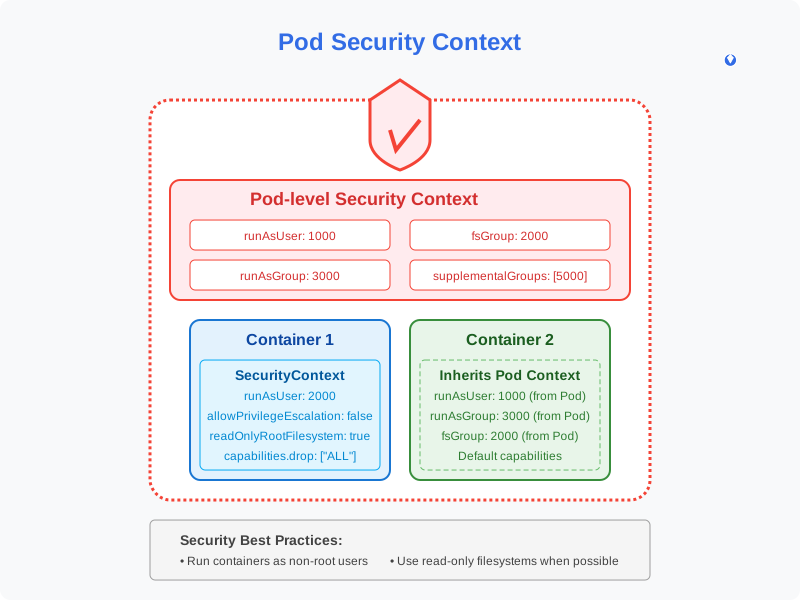
Pod-level Security Context:
spec:
  securityContext:
    runAsUser: 1000
    runAsGroup: 3000
    fsGroup: 2000
Container-level Security Context:
spec:
  containers:
  - name: security-context-demo
    image: busybox
    securityContext:
      runAsUser: 1000
      allowPrivilegeEscalation: false
      capabilities:
        add: ["NET_ADMIN"]
        drop: ["ALL"]
Security Best Practices:
- Run containers as non-root users
- Use read-only file systems when possible
- Drop unnecessary capabilities
- Implement Pod Security Policies (or PSA)
Troubleshooting Pods
When Pods don’t behave as expected, follow this systematic troubleshooting approach:
Common Pod Issues:
- ImagePullBackOff: Issues with pulling container images
- CrashLoopBackOff: Container repeatedly crashes after starting
- Pending state: Issues with scheduling
- Evicted: Pod evicted due to node resource pressure
Troubleshooting Commands:
# Get Pod status
kubectl get pod <pod-name>

# Detailed Pod information
kubectl describe pod <pod-name>

# Pod logs
kubectl logs <pod-name>
kubectl logs <pod-name> -c <container-name>  # For multi-container pods

# Previous container logs
kubectl logs <pod-name> --previous

# Execute commands in Pod
kubectl exec -it <pod-name> -- /bin/bash
Exam Tips for CKAD
To succeed in the CKAD exam, focus on these Pod-related tips:

- Practice kubectl commands: Become fast at creating and managing Pods
- Master YAML manifests: Learn to write Pod specifications from scratch
- Understand multi-container patterns: Know when to use sidecars, adapters, and ambassadors
- Resource management: Be able to configure requests and limits appropriately
- Troubleshooting: Practice diagnosing and fixing common Pod issues
- Use kubectl explain: When unsure about API fields (
kubectl explain pod.spec) - Use generators: Speed up creation with
kubectl runwhen appropriate
Hands-on Lab
Now, let’s apply our knowledge with a hands-on lab:
Lab: Multi-container Pod with Shared Data
Objective: Create a Pod with two containers sharing data through a volume.
Steps:
- Create a Pod manifest with an Nginx container and a busybox sidecar
- Mount a shared volume to both containers
- Configure the busybox container to write the date to a file every 5 seconds
- Configure Nginx to serve the content of this file
Solution:
apiVersion: v1
kind: Pod
metadata:
  name: shared-data-pod
spec:
  containers:
  - name: nginx-container
    image: nginx
    volumeMounts:
    - name: shared-data
      mountPath: /usr/share/nginx/html
  - name: date-updater
    image: busybox
    command: ["/bin/sh", "-c"]
    args:
      - while true; do
          date > /data/index.html;
          sleep 5;
        done
    volumeMounts:
    - name: shared-data
      mountPath: /data
  volumes:
  - name: shared-data
    emptyDir: {}
Conclusion
Pods are the fundamental building blocks of Kubernetes applications. Mastering Pods gives you the foundation to work with more complex resources and patterns in Kubernetes.
In this article, we’ve covered the essential aspects of Pods, from basic concepts to advanced configurations. Use this knowledge as a stepping stone in your CKAD journey, and continue practicing with hands-on exercises.
Next in our series, we’ll explore Kubernetes Deployments and how they manage Pods at scale.
Remember: The key to mastering Kubernetes is consistent practice and hands-on experience. Good luck on your CKAD journey!
This article is part of the CKAD Journey series. Follow along as we explore all the concepts needed to pass the Certified Kubernetes Application Developer exam.