CKAD-journey
Using Secrets in Pods
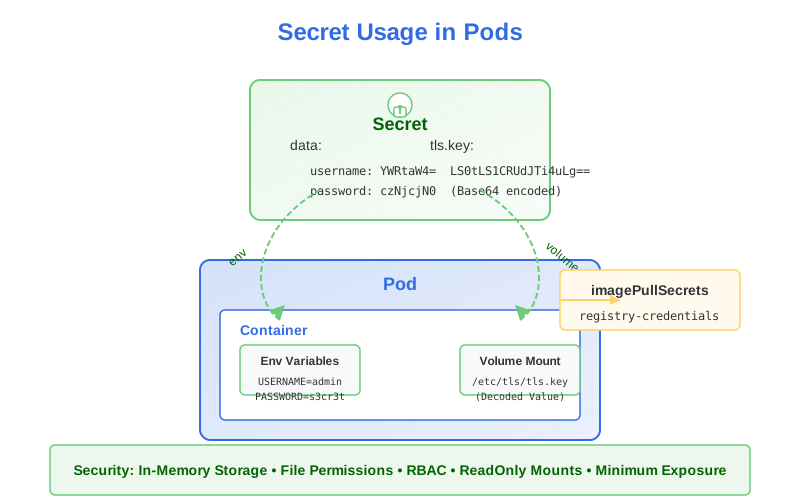
Once you’ve created Secrets to store your sensitive configuration, you need to make them available to your applications running in Pods. The methods for consuming Secret data are very similar to those for ConfigMaps, with some security-related differences.
Methods for Using Secrets in Pods
There are three main ways to use Secrets in your applications:
- Environment variables
- Volume mounts
- Image pull credentials
Let’s explore each method in detail.
Using Secrets as Environment Variables
1. Individual Environment Variables
You can set specific environment variables in a container by referencing individual Secret entries:
apiVersion: v1
kind: Pod
metadata:
  name: app-pod
spec:
  containers:
  - name: app-container
    image: myapp:1.0
    env:
    - name: DB_USERNAME                    # Name of environment variable
      valueFrom:
        secretKeyRef:
          name: db-creds                   # Name of the Secret
          key: username                    # Key within the Secret
          optional: true                   # Container starts even if Secret/key is missing
    - name: DB_PASSWORD
      valueFrom:
        secretKeyRef:
          name: db-creds
          key: password
In this example:
- The environment variables
DB_USERNAMEandDB_PASSWORDinside the container will have the values from theusernameandpasswordkeys in thedb-credsSecret. - The
optional: truefield means the container will start even if the Secret or key doesn’t exist.
2. All Secret Entries (envFrom)
To inject all key-value pairs from a Secret as environment variables:
apiVersion: v1
kind: Pod
metadata:
  name: app-pod
spec:
  containers:
  - name: app-container
    image: myapp:1.0
    envFrom:
    - secretRef:
        name: db-creds                     # Name of the Secret
        optional: true                     # Pod starts even if Secret is missing
With envFrom:
- Each key in the Secret becomes an environment variable name
- Each value becomes the corresponding environment variable value
- If a key in the Secret is not a valid environment variable name (contains invalid characters), it will be skipped
- You can prefix all environment variables using the
prefixfield
envFrom:
- secretRef:
    name: db-creds
    prefix: DB_                           # Adds DB_ prefix to all env vars
Using Secrets as Volumes
For sensitive configuration files or certificates, mounting Secrets as volumes is often more appropriate:
apiVersion: v1
kind: Pod
metadata:
  name: app-pod
spec:
  volumes:
  - name: secret-volume                    # Define volume name
    secret:
      secretName: tls-certs                # Reference to the Secret
  containers:
  - name: app-container
    image: myapp:1.0
    volumeMounts:
    - name: secret-volume                  # Mount the defined volume
      mountPath: /etc/certs                # Path inside the container
      readOnly: true                       # Recommended for sensitive data
With this configuration:
- Each key in the Secret becomes a file in the
/etc/certsdirectory - The filename is the key name
- The file content is the value (automatically decoded from Base64)
Mounting Specific Items
You can selectively mount only specific items from a Secret:
volumes:
- name: secret-volume
  secret:
    secretName: tls-certs
    items:                                 # Select specific items
    - key: tls.crt                         # Key in the Secret
      path: certificate.crt                # Filename in the volume
    - key: tls.key
      path: private.key
In this example, only two files will be created in the mount directory:
/etc/certs/certificate.crt(from thetls.crtkey)/etc/certs/private.key(from thetls.keykey)
Setting File Permissions
Setting appropriate file permissions is particularly important for sensitive files like private keys:
volumes:
- name: secret-volume
  secret:
    secretName: tls-certs
    defaultMode: 0600                      # Read/write for owner only
Or for individual files:
volumes:
- name: secret-volume
  secret:
    secretName: tls-certs
    items:
    - key: tls.crt
      path: certificate.crt
      mode: 0644                           # Readable by all
    - key: tls.key
      path: private.key
      mode: 0600                           # Read/write by owner only
Mounting at a Specific Path
You can mount a Secret at a specific subpath within the container:
volumeMounts:
- name: secret-volume
  mountPath: /etc/nginx/ssl/certificate.crt  # Specific file path
  subPath: tls.crt                         # Key in the Secret
Important: Using
subPathprevents automatic updates when the Secret changes.
Using Secrets for Container Image Registry Credentials
Kubernetes can use Secrets to authenticate to private container registries when pulling images:
apiVersion: v1
kind: Secret
metadata:
  name: registry-credentials
type: kubernetes.io/dockerconfigjson
data:
  .dockerconfigjson: eyJhdXRocyI6e...     # Base64-encoded Docker config.json
To create this Secret imperatively:
kubectl create secret docker-registry registry-credentials \
  --docker-server=registry.example.com \
  --docker-username=username \
  --docker-password=password \
  --docker-email=email@example.com
Then reference it in your Pod:
apiVersion: v1
kind: Pod
metadata:
  name: private-app
spec:
  containers:
  - name: app-container
    image: registry.example.com/myapp:1.0
  imagePullSecrets:
  - name: registry-credentials
You can also configure registry credentials at the ServiceAccount level, making them available to all Pods using that ServiceAccount:
apiVersion: v1
kind: ServiceAccount
metadata:
  name: app-sa
imagePullSecrets:
- name: registry-credentials
How Secret Volumes Work
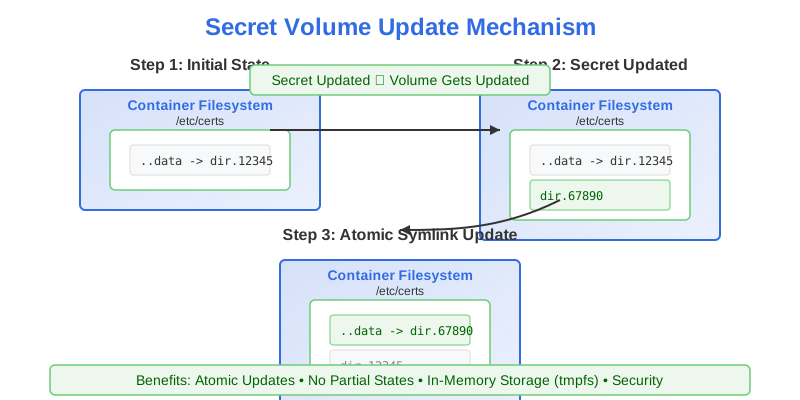
Secrets mounted as volumes work similarly to ConfigMap volumes:
- When a Secret volume is mounted, Kubernetes creates symbolic links in the volume
- Each symbolic link points to a file in a hidden directory
- The special
.datasymlink points to the currently active directory - When the Secret is updated, Kubernetes:
- Creates a new timestamped directory
- Writes the updated files to this directory
- Atomically updates the
.datasymlink to point to the new directory
This ensures applications see a consistent view of the Secret data.
The update process is:
- Completely atomic (no partial updates)
- Eventually consistent (may take up to a minute to propagate)
- Not applied when using
subPathin yourvolumeMount
Security Considerations
When using Secrets, keep these security considerations in mind:
1. Environment Variables vs. Volume Mounts
Environment variables are stored in:
- The container process’s environment
- Potentially in log files if the application logs its environment
- Process listings on the node (visible with commands like
ps)
For these reasons, volume mounts are generally more secure for highly sensitive data.
2. Secret Data in Memory
When mounted as volumes, Secrets are stored in tmpfs (memory-only filesystems) on nodes, not on disk. This provides an additional layer of security against certain attack vectors.
3. Restricting Access to Secrets
Use RBAC to restrict which users, groups, and ServiceAccounts can access your Secrets:
apiVersion: rbac.authorization.k8s.io/v1
kind: Role
metadata:
  namespace: default
  name: secret-reader
rules:
- apiGroups: [""]
  resources: ["secrets"]
  resourceNames: ["app-tls-cert"]          # Specific Secret name
  verbs: ["get", "watch", "list"]
4. Network Encryption
By default, all API communication in Kubernetes is encrypted with TLS. However, for additional security:
- Use network policies to restrict Pod-to-Pod communication
- Consider service meshes that provide mutual TLS for all service communication
Common Use Cases and Patterns
1. Database Credentials
Provide database connection credentials to applications:
apiVersion: v1
kind: Secret
metadata:
  name: db-credentials
type: Opaque
stringData:
  username: admin
  password: s3cret
  connection-string: "postgres://admin:s3cret@postgres:5432/mydb"

---
apiVersion: v1
kind: Pod
metadata:
  name: backend-app
spec:
  containers:
  - name: app
    image: myapp:1.0
    env:
    - name: DB_CONNECTION_STRING
      valueFrom:
        secretKeyRef:
          name: db-credentials
          key: connection-string
2. TLS Certificates
Provide TLS certificates to web servers or API gateways:
apiVersion: v1
kind: Secret
metadata:
  name: web-tls
type: kubernetes.io/tls
data:
  tls.crt: base64-encoded-cert
  tls.key: base64-encoded-key

---
apiVersion: v1
kind: Pod
metadata:
  name: web-server
spec:
  volumes:
  - name: tls-certs
    secret:
      secretName: web-tls
  containers:
  - name: nginx
    image: nginx:1.19
    volumeMounts:
    - name: tls-certs
      mountPath: /etc/nginx/ssl
      readOnly: true
3. API Keys and Tokens
Provide API authentication tokens to services:
apiVersion: v1
kind: Secret
metadata:
  name: api-tokens
type: Opaque
stringData:
  payment-api-key: "ab12-cd34-ef56-gh78"
  notification-service-token: "eyJhbGciOiJIUzI..."

---
apiVersion: v1
kind: Pod
metadata:
  name: payment-service
spec:
  containers:
  - name: payment-service
    image: payment-service:1.0
    env:
    - name: PAYMENT_API_KEY
      valueFrom:
        secretKeyRef:
          name: api-tokens
          key: payment-api-key
Best Practices for Using Secrets in Pods
-
Use ReadOnly Mounts: Always mount Secret volumes as read-only to prevent accidental modification:
volumeMounts: - name: secret-volume mountPath: /etc/certs readOnly: true -
Set Appropriate File Permissions: Use
defaultModeor individualmodesettings to restrict file permissions, especially for private keys:volumes: - name: secret-volume secret: secretName: tls-certs defaultMode: 0400 # Read-only for owner -
Prefer Volume Mounts for Sensitive Data: For highly sensitive data like private keys, prefer volume mounts over environment variables.
-
Handle Missing Secrets Gracefully: Use the
optional: truefield when your application can function without a specific Secret. -
Use Specific Secret Types: Use the appropriate Secret type (
kubernetes.io/tls,kubernetes.io/basic-auth, etc.) to make validation and usage clearer. -
Validate Secret Access at Startup: If your application depends on Secrets, validate their existence and correctness at startup.
- Implement Proper Application Security: Ensure your application handles sensitive data securely by:
- Not logging sensitive information
- Clearing sensitive data from memory when no longer needed
- Implementing proper error handling that doesn’t expose sensitive data
- Monitor Secret Usage: Implement audit logging to track who is accessing Secrets.
Troubleshooting Secret Issues
Common issues when working with Secrets include:
-
Incorrect Base64 Encoding: When creating Secrets using the
datafield, ensure values are properly Base64-encoded. UsestringDatato avoid this issue. -
Missing Required Keys for Typed Secrets: Ensure typed Secrets contain all required keys (e.g.,
tls.crtandtls.keyfor TLS Secrets). -
Secret Size Limitations: Secrets are limited to 1MB in size. For larger data, consider using external storage or breaking into multiple Secrets.
-
Permission Issues: Check that file permissions set with
defaultModeor individualmodeare appropriate for your application. -
Update Propagation Delay: Like ConfigMaps, changes to Secrets mounted as volumes may take some time to propagate (up to a minute).
-
RBAC Issues: Ensure Pods have appropriate permissions to access the Secrets they need via their ServiceAccount.
In the CKAD Exam
For the CKAD exam, be prepared to:
- Create Pods that consume Secret data via environment variables and volumes
- Understand how to create and use different types of Secrets (especially TLS Secrets)
- Set appropriate file permissions for mounted Secrets
- Configure image pull Secrets for private registries
- Know how to safely decode and view Secret values for debugging
In the next section, we’ll explore advanced techniques for ConfigMaps and Secrets, including projected volumes and immutable configurations.