CKAD-journey
Secret Fundamentals
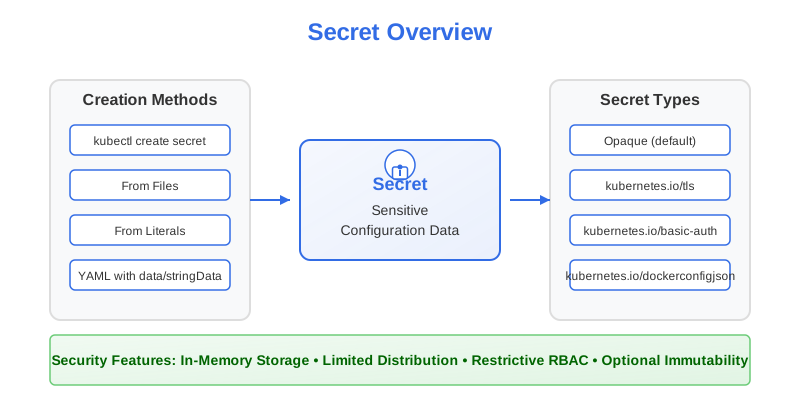
What are Secrets?
A Secret is a Kubernetes object specifically designed for storing sensitive information such as:
- Passwords
- OAuth tokens
- SSH keys
- TLS certificates
- API keys
- Database credentials
Like ConfigMaps, Secrets help decouple sensitive configuration data from your application code and container images. However, Secrets are specifically intended for sensitive data and include additional security features that ConfigMaps do not provide.
Secrets vs ConfigMaps
While Secrets share many similarities with ConfigMaps, there are key differences:
| Feature | Secrets | ConfigMaps |
|---|---|---|
| Purpose | For sensitive information | For non-sensitive configuration |
| Data Fields | data (Base64-encoded) and stringData (plaintext, write-only) |
data (plaintext) and binaryData (Base64-encoded) |
| Storage | Stored only in memory (tmpfs) on nodes that need them | Stored on disk on nodes |
| Access Control | More restrictive RBAC default policies | Less restrictive RBAC default policies |
| Encoding | Values in data are always Base64-encoded |
Values in data are plaintext |
| Type Field | Has a type field for classification |
No type field |
| Size Limit | Limited to ~1MB | Limited to ~1MB |
Important: Base64 encoding in Secrets is not encryption. It’s an encoding scheme that allows for storing binary data. By itself, it doesn’t provide security.
Secret Types
Kubernetes defines several built-in Secret types, identified by the type field:
| Secret Type | Description | Required Keys |
|---|---|---|
Opaque |
Default type, arbitrary user-defined data | none |
kubernetes.io/service-account-token |
ServiceAccount token | token, ca.crt, namespace |
kubernetes.io/dockercfg |
Legacy Docker registry credentials | .dockercfg |
kubernetes.io/dockerconfigjson |
Modern Docker registry credentials | .dockerconfigjson |
kubernetes.io/basic-auth |
Basic authentication credentials | username, password |
kubernetes.io/ssh-auth |
SSH credentials | ssh-privatekey |
kubernetes.io/tls |
TLS certificate and private key | tls.crt, tls.key |
bootstrap.kubernetes.io/token |
Bootstrap token data | token-id, token-secret |
The type field helps Kubernetes validate the Secret and helps users understand the Secret’s purpose. For the CKAD exam, the most common types you’ll work with are Opaque (the default) and kubernetes.io/tls.
Creating Secrets
As with ConfigMaps, there are two main approaches to creating Secrets:
1. Imperative Approach (Using kubectl commands)
From Literal Values
# Basic syntax
kubectl create secret generic <n> --from-literal=<key>=<value>

# Example
kubectl create secret generic db-creds \
    --from-literal=username=admin \
    --from-literal=password=s3cr3t
From Files
# Create a Secret from files
kubectl create secret generic tls-certs \
    --from-file=tls.crt=path/to/cert.crt \
    --from-file=tls.key=path/to/key.key
Creating TLS Secrets
Kubernetes provides a specific command for creating TLS Secrets:
kubectl create secret tls my-tls-secret \
    --cert=path/to/cert.crt \
    --key=path/to/key.key
This creates a Secret of type kubernetes.io/tls with the keys tls.crt and tls.key.
From Environment Files
Similar to ConfigMaps, you can create Secrets from files containing key-value pairs:
# File content example:
# USERNAME=admin
# PASSWORD=s3cr3t

kubectl create secret generic db-creds --from-env-file=path/to/secret.env
2. Declarative Approach (Using YAML Manifests)
Creating Secrets declaratively involves writing a YAML manifest file. However, there are two ways to specify the data:
Using data (Base64-encoded values)
When using the data field, values must be Base64-encoded:
# Encode values to base64
echo -n 'admin' | base64      # Output: YWRtaW4=
echo -n 's3cr3t' | base64     # Output: czNjcjN0
Then, use these encoded values in your manifest:
apiVersion: v1
kind: Secret
metadata:
  name: db-creds
type: Opaque
data:
  username: YWRtaW4=         # Base64-encoded 'admin'
  password: czNjcjN0         # Base64-encoded 's3cr3t'
Using stringData (Plaintext values)
For better readability and ease of use, you can use the stringData field, which accepts plaintext values:
apiVersion: v1
kind: Secret
metadata:
  name: db-creds
type: Opaque
stringData:
  username: admin
  password: s3cr3t
When this Secret is created, Kubernetes automatically encodes the values and stores them in the data field. The stringData field is write-only and not included when retrieving the Secret.
Combining data and stringData
You can use both fields in the same Secret manifest:
apiVersion: v1
kind: Secret
metadata:
  name: combined-secret
type: Opaque
data:
  token: dG9rZW4xMjM=         # Base64-encoded binary data
stringData:
  config.json: |
    {
      "apiKey": "abc123",
      "environment": "production"
    }
When mixing data and stringData, if the same key appears in both, the value from stringData takes precedence.
Creating a TLS Secret
For TLS Secrets, use the appropriate type:
apiVersion: v1
kind: Secret
metadata:
  name: tls-secret
type: kubernetes.io/tls
data:
  tls.crt: LS0tLS1CRUdJTiBDRVJUSUZJQ0FURS0tLS0t...      # Base64-encoded certificate
  tls.key: LS0tLS1CRUdJTiBQUklWQVRFIEtFWS0tLS0t...      # Base64-encoded private key
Or using stringData (less common for TLS):
apiVersion: v1
kind: Secret
metadata:
  name: tls-secret
type: kubernetes.io/tls
stringData:
  tls.crt: |
    -----BEGIN CERTIFICATE-----
    ...certificate content...
    -----END CERTIFICATE-----
  tls.key: |
    -----BEGIN PRIVATE KEY-----
    ...private key content...
    -----END PRIVATE KEY-----
Managing Secrets
Viewing Secrets
# List all Secrets in the current namespace
kubectl get secrets

# Get detailed info about a specific Secret
kubectl describe secret <n>

# View the manifest of a Secret (values will be Base64-encoded)
kubectl get secret <n> -o yaml
Note: The
kubectl describe secretcommand shows the keys but not the values to prevent accidental exposure of sensitive data.
To view a Secret’s actual values, you need to extract and decode them:
# Extract a specific value and decode it
kubectl get secret db-creds -o jsonpath='{.data.password}' | base64 --decode
Editing Secrets
You can edit existing Secrets:
# Interactive edit
kubectl edit secret <n>

# Direct update using patch
kubectl patch secret <n> --patch '{"data":{"key1":"bmV3LXZhbHVl"}}'
Remember that when editing Secrets via kubectl edit, you must provide Base64-encoded values for the data field.
Deleting Secrets
kubectl delete secret <n>
Secret Security Considerations
While Secrets provide a better way to manage sensitive data than ConfigMaps, they have several security considerations:
1. Base64 Encoding Is Not Encryption
The data in Secrets is only Base64-encoded, not encrypted. Anyone with permissions to read the Secret can see the sensitive data. Therefore:
- Use RBAC to restrict access to Secrets
- Be careful with who can access etcd (where Secrets are stored)
- Consider using an external secrets management system for highly sensitive data
2. Node-Level Security
Kubernetes provides some node-level security for Secrets:
- Secrets are stored in tmpfs (memory-only filesystem) on nodes, not on disk
- Secrets are only distributed to nodes running Pods that need them
- When a Pod is deleted, its Secret data is deleted from the node
3. Secret Immutability
For added security, you can make Secrets immutable:
apiVersion: v1
kind: Secret
metadata:
  name: immutable-secret
type: Opaque
data:
  username: YWRtaW4=
  password: czNjcjN0
immutable: true  # Makes this Secret immutable
Immutable Secrets cannot be updated or deleted until the immutable field is removed, providing additional protection against accidental changes.
Best Practices for Secrets
-
Don’t Commit Secrets to Version Control: Never store Secret manifests containing actual sensitive data in Git repositories.
-
Use Specific Secret Types: Use the appropriate Secret type (
kubernetes.io/tls,kubernetes.io/basic-auth, etc.) to make your intentions clear. -
Limit Access with RBAC: Configure Role-Based Access Control to restrict who can read or modify Secrets.
-
Use
stringDatafor Clarity: When creating Secrets declaratively, usestringDatafor better readability and to avoid Base64 encoding errors. -
Consider External Secret Management: For production environments, consider using tools like HashiCorp Vault, AWS Secrets Manager, or Azure Key Vault along with controllers like External Secrets Operator.
-
Make Critical Secrets Immutable: For important Secrets that shouldn’t change, use the
immutable: truefield. -
Use Minimal Scope: Provide Pods access only to the Secrets they need.
-
Rotate Secrets Regularly: Establish a process to rotate credentials and update Secrets periodically.
In the CKAD Exam
For the CKAD exam, make sure you can:
- Create Secrets using both imperative and declarative approaches
- Understand the difference between
dataandstringDatafields - Create Secrets from literals, files, and environment files
- Create TLS Secrets with the proper keys
- Understand how to extract and decode Secret values
In the next section, we’ll explore how to use Secrets within Pods to provide sensitive configuration to your applications.