CKAD-journey
ConfigMap Fundamentals
What are ConfigMaps?
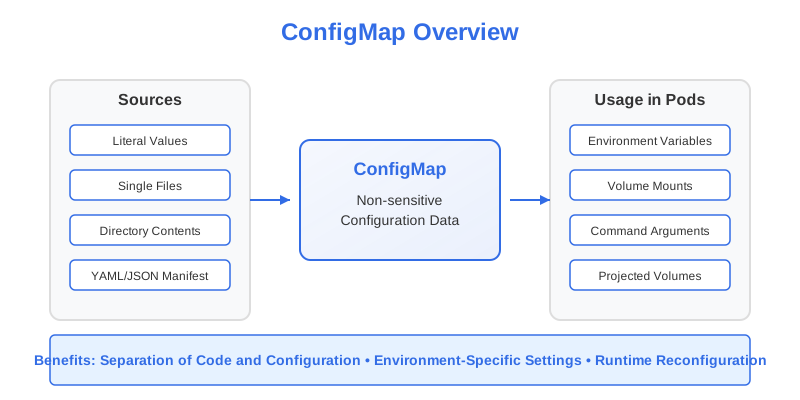
A ConfigMap is a Kubernetes API object used to store non-sensitive configuration data in key-value pairs. ConfigMaps serve a critical purpose: they decouple configuration from application code and container images. This separation enables you to:
- Keep your container images generic and reusable
- Change configuration without rebuilding images
- Use the same application across different environments (development, testing, production)
- Follow container best practices by maintaining immutable application images
ConfigMaps can store:
- Individual key-value pairs
- Entire configuration files
- JSON/YAML formatted data
- Plain text strings
Creating ConfigMaps
There are two primary approaches to creating ConfigMaps in Kubernetes:
1. Imperative Approach (Using kubectl commands)
The imperative approach is faster for quick operations and is often useful during development or for the CKAD exam.
From Literal Values
# Basic syntax
kubectl create configmap <name> --from-literal=<key>=<value>

# Example with a single key-value pair
kubectl create configmap app-config --from-literal=app.environment=production

# Example with multiple key-value pairs
kubectl create configmap app-config \
    --from-literal=app.environment=production \
    --from-literal=app.log-level=info \
    --from-literal=app.max-connections=100
Note: Key names can only contain alphanumeric characters, dashes (
-), underscores (_), and dots (.).
From Files
To create a ConfigMap from a file’s contents:
# Basic syntax
kubectl create configmap <name> --from-file=<key>=<file-path>

# Examples
kubectl create configmap nginx-config --from-file=nginx.conf=/path/to/nginx.conf

# Using the filename as the key (omitting the key= part)
kubectl create configmap nginx-config --from-file=/path/to/nginx.conf
From Directories
You can create a ConfigMap from all files in a directory:
kubectl create configmap app-config --from-file=/path/to/config/dir/
When creating from a directory:
- Each file becomes a separate entry in the ConfigMap
- The filename becomes the key
- The file content becomes the value
- Subdirectories, symbolic links, devices, and pipes are ignored
- Files with names that aren’t valid ConfigMap keys are skipped
From Environment Files
You can create ConfigMaps from files containing key-value pairs (like .env files):
# env-file format example:
# KEY1=VALUE1
# KEY2=VALUE2

kubectl create configmap app-env --from-env-file=/path/to/.env
2. Declarative Approach (Using YAML Manifests)
The declarative approach involves creating a YAML manifest file and applying it with kubectl. This method is preferred for production environments and version-controlled configurations.
apiVersion: v1
kind: ConfigMap
metadata:
  name: app-config
data:
  # Simple key-value pairs
  app.environment: production
  app.log-level: info
  app.max-connections: "100"

  # Configuration file as a multi-line string
  app.properties: |
    server.port=8080
    spring.application.name=myapp
    management.endpoints.web.exposure.include=health,info,metrics

  # JSON configuration
  config.json: |
    {
      "environment": "production",
      "features": {
        "authentication": true,
        "authorization": true,
        "rateLimit": {
          "enabled": true,
          "limit": 100
        }
      }
    }
Apply the manifest with:
kubectl apply -f configmap.yaml
Using Binary Data
For binary data (or if you prefer Base64 encoding), you can use the binaryData field:
apiVersion: v1
kind: ConfigMap
metadata:
  name: binary-config
binaryData:
  # Base64-encoded binary data
  sample.bin: SGVsbG8gV29ybGQh
data:
  # Regular text data can still be included
  config.txt: Hello World
Managing ConfigMaps
Viewing ConfigMaps
# List all ConfigMaps in the current namespace
kubectl get configmaps

# List with more details
kubectl get configmaps -o wide

# Get detailed info about a specific ConfigMap
kubectl describe configmap <name>

# View the manifest of a ConfigMap
kubectl get configmap <name> -o yaml
Editing ConfigMaps
You can edit existing ConfigMaps:
# Interactive edit
kubectl edit configmap <name>

# Direct update using patch
kubectl patch configmap <name> --patch '{"data":{"key1":"new-value"}}'
Deleting ConfigMaps
kubectl delete configmap <name>
ConfigMap Limitations and Best Practices
Limitations
- ConfigMaps are limited to 1MB in size
- Key names must be valid DNS subdomain names
- ConfigMaps are not suitable for sensitive data (use Secrets instead)
- ConfigMaps are stored in plaintext in etcd
Best Practices
-
Group Related Data: Organize related configuration data in a single ConfigMap rather than creating many small ConfigMaps.
-
Use Meaningful Names: Name ConfigMaps descriptively to indicate their purpose and content.
-
Version Control: Keep ConfigMap definitions in version control, especially for declarative management.
-
Namespace Scope: Remember that ConfigMaps are namespace-scoped resources. They must be in the same namespace as the Pods that use them.
-
Avoid Sensitive Data: Never store sensitive information like passwords, tokens, or keys in ConfigMaps. Use Secrets for that purpose.
-
Documentation: Document the purpose of each key in your ConfigMaps, especially for complex configurations.
In the CKAD Exam
For the CKAD exam, make sure you can:
- Create ConfigMaps using both imperative and declarative approaches
- Create ConfigMaps from literals, files, and directories
- Display and interpret ConfigMap data
- Understand the structure of a ConfigMap YAML manifest
In the next section, we’ll explore how to use ConfigMaps within Pods to configure applications.